
lettering Tattoo - Font Design
Saman rezazadehArt & Design
4.528.00 Reviews
- Version
- 3.7.1
- Installs
- 100.00K
- Age Rating
- Everyone
Screenshots
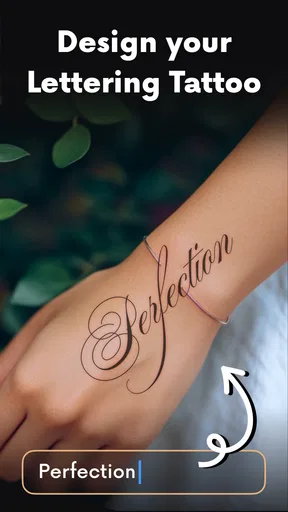
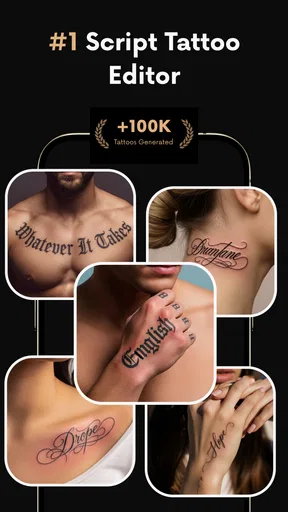
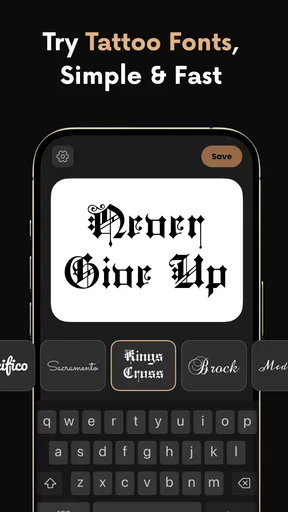
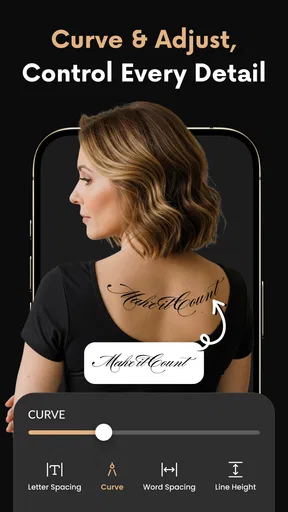
Our Review of lettering Tattoo - Font Design
 Analysis by Appyee
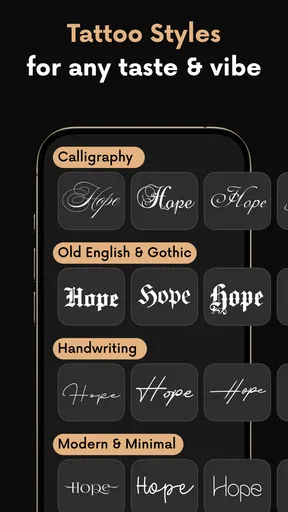
When I want to explore a tattoo idea without opening a complicated design suite, I look for one thing first: can the app help me turn a word or short phrase into something that feels ready to discuss with a tattoo artist? lettering Tattoo - Font Design is built around that simple decision. It focuses on lettering, especially script and cursive styles, rather than trying to be a complete illustration studio.
That narrow purpose is its biggest strength. I can use it to experiment with the visual mood of a name, date, quote, or single word, then compare lettering choices before making any permanent decision. It belongs to the Art & Design category and is made by Saman rezazadeh. The app is free to install, carries an Everyone age rating, and has reached over 100 thousand installs. Its average rating is 4.5 from around 1.5 thousand ratings, which suggests that many people find the focused approach useful.
I would not treat it as a replacement for a professional tattoo artist, a vector editor, or a full drawing application. I see it more as a quick lettering workbench: a place to test direction, spacing, and style before taking an idea further. That distinction matters, because the right choice depends on whether you need inspiration and presentation or precise production artwork.
What I look for before choosing a tattoo lettering app
My first decision criterion is speed. If I am only checking whether a phrase looks better in a flowing script or a more restrained handwritten style, a full design program can feel excessive. An app like this makes more sense when the question is visual and immediate: does the lettering feel personal, readable, balanced, and suitable for the body placement I have in mind?
The second criterion is control. A font preview is helpful, but tattoo lettering needs more than a pretty typeface. I want to inspect how letters connect, whether capitals dominate the word, whether the spaces between characters feel awkward, and whether a long phrase becomes difficult to read. I also need to remember that a design that looks elegant on a phone screen may need changes when transferred to skin.
The third criterion is offline convenience. The app is presented as an offline editor, so it is especially practical for browsing and refining ideas without depending on a constant connection. That can be useful in a waiting room, during travel, or while discussing a concept with someone beside me. It also makes the workflow feel less like searching a website and more like keeping a small design notebook on the phone.
Finally, I consider how much of the job I want the app to handle. If I need layered illustrations, detailed shading, custom vector paths, or a polished stencil prepared for a studio, lettering Tattoo - Font Design is not the whole answer. If I need a fast way to compare script treatments and communicate a direction, its limited scope becomes an advantage rather than a weakness.
My first workflow: phrase, style, placement, discussion
I get the most value by starting with a short phrase instead of browsing aimlessly. I type the exact wording I am considering, then move through the available cursive and calligraphy-oriented looks. This prevents the common mistake of choosing a font because it looks attractive in isolation. A style that suits one short name may become cramped or confusing when applied to a sentence.
After choosing a few candidates, I compare them at the same approximate size and in the same order. I pay attention to the first and last letters, because those often determine whether the design feels open or boxed in. I also look at repeated letters and narrow joins. These details are easy to miss when switching randomly between previews, but they can change the entire character of a tattoo.
My useful habit is to make a small shortlist rather than treating the first attractive result as finished. I keep one option that is highly decorative, one that is easier to read, and one that sits between the two. That gives a tattoo artist a meaningful starting point and creates a better conversation than simply saying, “I want something cursive.”
For a real everyday scenario, imagine someone planning a small memorial tattoo during a lunch break. They may have a name in mind but no clear style. With this app, they can test several lettering directions, show the strongest options to a family member, and arrive at a studio with a clearer preference. The app does not make the emotional decision for them, but it reduces the uncertainty around the visual one.
Where the focused lettering approach wins
The strongest part of my experience is the app’s concentration on script tattoo ideas. Instead of asking me to assemble a design from brushes, layers, shapes, and unrelated tools, it puts the lettering question at the center. That is valuable when the tattoo is primarily text and I want to spend my attention on the personality of the letters.
It is also approachable for people who do not normally use design software. A full editor can make a simple word feel like a technical project. Here, the starting point is familiar: enter text, inspect a style, and decide whether the result feels right. That lower barrier is important for first-time tattoo planners who want to explore without learning a professional interface.
The script and cursive emphasis is another practical advantage. These styles can communicate softness, intimacy, elegance, or movement, but they also vary greatly in readability. Having a dedicated place to compare them helps me notice differences that I might overlook if I searched for random examples online. I can judge the actual phrase rather than imagining how a generic alphabet might behave.
The offline editor adds a useful layer of flexibility. I can revisit a concept when I am away from reliable service, and I do not have to rebuild the idea each time I want to show it to someone. For a personal design process, that continuity is more valuable than it sounds. Tattoo ideas often develop in small moments rather than in one long session.
The current version is 3.7.1, and the app runs on Android devices using version 6.0 or later. That gives it a broad practical reach for people using older compatible phones, although the experience will naturally depend on the device and screen. I would still judge the final lettering on a larger display or in conversation with the artist, because a phone preview is only one stage of the process.
Three details that improve the result
My first non-obvious tip is to test the phrase in its final capitalization. Changing the first letter later can alter the rhythm dramatically in script lettering. A capital may be much taller, more ornate, or more dominant than the rest of the word, so comparing lowercase, title case, and all-capital versions can reveal which format actually fits the idea.
My second tip is to test the design as a whole line, not only as an isolated word. Long quotes expose problems that are invisible in short previews: crowded joins, weak punctuation, uneven visual weight, and a final word that feels squeezed. If the app helps me identify those issues early, I can shorten the wording or ask the tattoo artist to rebuild the spacing instead of forcing an unsuitable composition.
My third tip is to use the app for communication, not just selection. I can show a preferred style and a rejected style, explaining what I like about each. For example, I might prefer the movement of one script but the readability of another. That gives the artist useful creative boundaries while leaving room for professional adjustments based on body placement, scale, and long-term legibility.
A fourth useful trade-off is accepting that decorative lettering should not automatically win. On a small tattoo, fine connections and elaborate flourishes may merge visually over time or become hard to read from a normal distance. I use the most ornamental option as inspiration, then compare it with a simpler alternative. The simpler version often communicates the message better, even if it looks less dramatic in the preview.
Where other kinds of apps may fit better
Lettering Tattoo - Font Design is a poor match when the main idea includes a portrait, animal, botanical composition, geometric construction, or detailed symbolic artwork. In those cases, a drawing app with layers and brushes gives me more freedom. A vector design tool is also better when I need exact curves, scalable output, or careful preparation for a professional production workflow.
It may also be the wrong choice for someone who already knows the exact lettering style they want and needs only a technical stencil. The app can help with visual exploration, but a tattoo artist may still redraw the lettering to suit the skin, placement, and required line weight. Someone seeking a final, studio-ready file should ask the artist what format and preparation they prefer rather than assuming a phone preview is sufficient.
Compared with browsing font websites, the app feels more direct for mobile experimentation. Websites can offer broader discovery, but they may encourage endless searching instead of focused comparison. Compared with a full creative suite, this app is easier to approach but much less suitable for complex composition. Compared with asking a tattoo artist immediately, it gives me more time to clarify my taste, though it cannot replace the artist’s judgement.
That last comparison is important. I would not use an app preview as proof that a design is safe, technically appropriate, or suitable for every body area. It is a conversation aid. The artist should decide how the lettering needs to be adapted, especially where skin movement, size, curvature, and readability affect the result.
Free access, optional spending, and the cost of switching
The app is free, which makes it easy to try before committing to a particular lettering workflow. There are in-app purchases ranging from $1.99 to $29.99 per item. I would approach those purchases carefully and first decide whether the free experience already answers my question. For a one-time tattoo idea, paying for extras may not be worthwhile if I only need a basic comparison.
The cost of switching is low if I am still at the inspiration stage. I can use this app to narrow down a direction, then move the selected concept to an artist or another design tool. The bigger cost comes from relying on it too late in the process. If I spend a long time polishing a preview that cannot be adapted cleanly for the intended placement, I may have to redo the work elsewhere.
For that reason, I save the app’s output as a reference rather than treating it as a final specification. I note the exact wording, preferred style, and what I want changed. If a purchase unlocks something I find useful, I still compare that benefit with the possibility that my artist will redraw the lettering from scratch. The practical value is highest when the app helps me make a better decision, not when I expect it to complete every professional step.
Another question I would ask is whether the app suits a person who wants to work entirely offline. Its offline-editor positioning makes it a sensible option for that workflow, particularly when I want to revisit ideas without depending on a live connection. I would still keep a separate record of the final wording, because a tattoo design is too permanent to risk an avoidable spelling or punctuation mistake.
Who should use it, and who should skip it
I recommend it to first-time tattoo planners, people choosing lettering for a meaningful name or phrase, and anyone who wants a quick mobile way to compare cursive moods. It is especially useful if you are undecided between elegant, flowing, and more readable script treatments. The Everyone rating also makes it approachable for general creative exploration, although the tattoo decision itself should always be handled thoughtfully.
I would also suggest it to someone preparing for a consultation. Bringing several carefully considered references is more helpful than arriving with a vague request. The app can help you discover whether you prefer a compact wordmark, a loose handwritten feeling, or a more formal calligraphic appearance. That preparation can make the studio discussion shorter and more productive.
I would skip it if my project depends on illustration, photo editing, exact vector construction, or professional prepress control. I would also skip it if I expect an automatic design generator to solve the creative decision for me. The app offers a place to compare lettering, but my judgement still matters. A font cannot decide whether a phrase is emotionally appropriate, readable at the intended size, or likely to age well.
People who dislike optional purchase prompts may also prefer a simpler tool, depending on how they use the app. Since the app is free to start but includes item-based purchases, I would not begin by assuming every style or capability is included. I would explore the basic workflow first and only spend money when a specific addition clearly improves the design I am actually considering.
My recommendation after using it as a decision tool
My recommendation is positive, with a clear boundary: use lettering Tattoo - Font Design as a focused idea and comparison tool, not as the final authority on a tattoo. Its value comes from making script exploration quick, personal, and easy to revisit. The offline editing angle makes it convenient, and the narrow Art & Design focus keeps the experience more approachable than a large creative suite.
I would install it when the tattoo is mainly words and I am still deciding how those words should feel. I would type the final phrase carefully, compare a small group of styles, test the capitalization and full line, and bring the strongest references to a professional artist. That workflow turns a vague idea into a useful brief without pretending that a phone screen can replace tattoo expertise.
The app’s free entry point makes that experiment easy, while the optional purchases mean I would evaluate extras according to the value of the specific project. Its 4.5 average and over 100 thousand installs show that it has found an audience, but those figures are less important than whether its focused lettering workflow matches my needs.
In short, I see it as a practical first stop for script tattoo inspiration. It wins when speed, offline access, and readable style comparison matter. It loses when I need complex artwork or production-level control. If your idea begins with a meaningful phrase and you want to understand how that phrase might look before meeting an artist, this is a sensible app to try first.
Verdict
Strengths of lettering Tattoo - Font Design
- Wide selection of tattoo-inspired fonts for creative lettering
- Simple interface makes experimenting with designs quick and accessible
- Useful preview tools help compare different lettering styles
- Suitable for tattoo concepts, logos, posters, and social media graphics
- Supports fast idea generation without requiring advanced design skills
Limitations of lettering Tattoo - Font Design
- Some fonts or design features may require in-app purchases
- Results may need further editing for professional tattoo application
- Limited customization compared with full graphic design software
- Font quality and readability can vary across different lettering styles
- Export options may be restricted depending on the selected design
Similar Picks in This Category
View All
Canva: AI Photo & Video Editor
Canva4.8

PENUP – Drawing-sharing SNS
Samsung Electronics Co., Ltd.4.5

Crafto
Kutumb App4.6

Sketchbook
Sketchbook4.1

ibis Paint X
ibis inc.4.5

Adobe Express: AI Photo, Video
Adobe4.6
Frequently Asked Questions
What is Lettering Tattoo - Font Design used for?
Lettering Tattoo - Font Design is a creative tool for exploring tattoo lettering ideas and designing text-based concepts. It lets you experiment with different fonts, layouts, styles, and visual effects before committing to a tattoo. The app can be useful for people who want inspiration, artists preparing a draft, or anyone comparing how a name, quote, or symbol might look on the skin.
Does Lettering Tattoo - Font Design include many tattoo fonts and customization options?
The app focuses on typography-based tattoo design, offering a selection of lettering styles that can help you create anything from elegant names to bold gothic phrases. Depending on the design, users can adjust text appearance, positioning, and overall composition. It is best viewed as an idea-generation and preview tool rather than a complete professional tattoo illustration suite.
Can I use the designs created in the app as a final tattoo stencil?
Designs made with Lettering Tattoo - Font Design should generally be treated as references or early concepts, not as guaranteed tattoo-ready stencils. A professional tattoo artist may need to redraw, resize, mirror, or refine the lettering so it suits the body area, skin movement, needle technique, and long-term readability. Always discuss the final design with your chosen artist before getting tattooed.
Is Lettering Tattoo - Font Design suitable for beginners?
Yes, the app is aimed at users who want to visualize tattoo lettering without advanced graphic-design experience. Its font-focused approach makes it relatively easy to test different ideas and compare styles. Beginners should still remember that an attractive screen preview may look different on real skin, particularly when the design is very small, highly detailed, or placed on an area that moves frequently.
Is Lettering Tattoo - Font Design free to download, and does it require internet access?
Availability, pricing, advertising, and optional purchases may vary according to the Android or iOS version and your region. Before downloading, check the official store listing for current details about subscriptions, in-app purchases, and privacy permissions. Basic browsing or editing may work offline, but some content, advertisements, sharing features, or updates could require an internet connection.
